> ## Documentation Index
> Fetch the complete documentation index at: https://docs.coderide.dev/llms.txt
> Use this file to discover all available pages before exploring further.
# API Testing
> Test REST APIs right in the editor, Postman-style requests as rest:// tabs, no separate app.
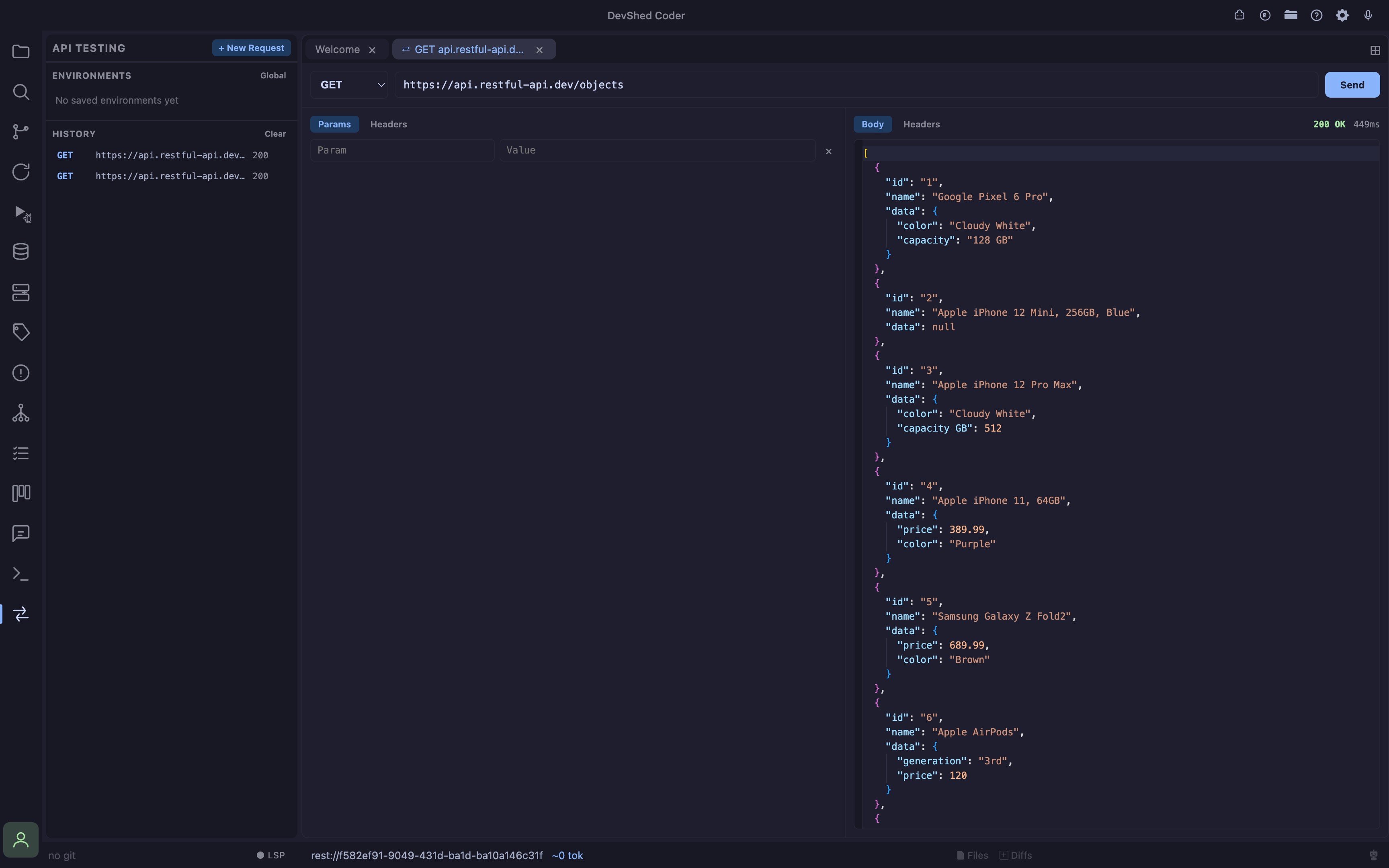 * **Test requests without leaving the editor** open a `rest://` tab, pick a method and URL, and send, response, headers, and timing show up next to the request, same as a dedicated API client but inside Coder
* **Runs through a local Go sidecar, not the browser** requests execute in a small native process, not the renderer's fetch, no CORS restrictions and no browser-restricted headers, since a real HTTP client is making the call, not a webpage
* **Params, Headers, and Body tabs** three sub-tabs under the URL bar hold query params, headers, and the request body; Params sync both ways with the URL, edit a row and the URL's query string updates, paste a URL with `?a=1&b=2` and Params fills in from it
* **Syntax-highlighted body and response** both the request body editor and the response viewer are Monaco, so JSON gets real syntax highlighting; the response language is picked automatically from the reply's `Content-Type` (JSON, HTML, or XML)
* **Saved environments** save a base URL plus auth (Bearer token, Basic auth, or an API key header) as a named environment, globally or per-project; opening a request against one prefixes relative paths with its base URL and adds its auth automatically, tokens are encrypted on disk and never sent back to the editor once saved
* **Request history** every send is logged with method, URL, status, and timing in the sidebar; click a history entry to reopen it as a new pre-filled request tab, or delete individual entries (or clear everything) with the buttons on each row / the section header
* **New tabs are scratch space** `rest://` tabs don't persist across a reload, they're throwaway request scratchpads, not saved work, so nothing dead is left behind after Cmd+R; save an environment or rely on history for anything you want to keep
* **Cmd+Shift+Y** toggles the API Testing panel
## Environments
An environment bundles a base URL with the auth Coder should attach automatically:
* **None**, no auth header added
* **Bearer Token**, adds `Authorization: Bearer `
* **Basic Auth**, adds `Authorization: Basic `
* **API Key**, adds a custom header name/value pair (e.g. `X-API-Key`)
Environments can be **global** (available in every project) or **project-scoped** (only visible in the project they were created in), the sidebar lists both together. Secrets (tokens, passwords, key values) are encrypted at rest and are never round-tripped back to the editor after saving; re-saving an environment without touching its secret field keeps the existing value.
## History
Every request that's actually sent is recorded, method, URL, request headers/body, response status, and timing, so you can come back to it later without re-typing anything. History is global (not tied to one project) so a request made anywhere shows up in the list.
This tool will grow to more advanced features
This documentation is built and hosted on [Mintlify](https://mintlify.com), a developer documentation platform.
* **Test requests without leaving the editor** open a `rest://` tab, pick a method and URL, and send, response, headers, and timing show up next to the request, same as a dedicated API client but inside Coder
* **Runs through a local Go sidecar, not the browser** requests execute in a small native process, not the renderer's fetch, no CORS restrictions and no browser-restricted headers, since a real HTTP client is making the call, not a webpage
* **Params, Headers, and Body tabs** three sub-tabs under the URL bar hold query params, headers, and the request body; Params sync both ways with the URL, edit a row and the URL's query string updates, paste a URL with `?a=1&b=2` and Params fills in from it
* **Syntax-highlighted body and response** both the request body editor and the response viewer are Monaco, so JSON gets real syntax highlighting; the response language is picked automatically from the reply's `Content-Type` (JSON, HTML, or XML)
* **Saved environments** save a base URL plus auth (Bearer token, Basic auth, or an API key header) as a named environment, globally or per-project; opening a request against one prefixes relative paths with its base URL and adds its auth automatically, tokens are encrypted on disk and never sent back to the editor once saved
* **Request history** every send is logged with method, URL, status, and timing in the sidebar; click a history entry to reopen it as a new pre-filled request tab, or delete individual entries (or clear everything) with the buttons on each row / the section header
* **New tabs are scratch space** `rest://` tabs don't persist across a reload, they're throwaway request scratchpads, not saved work, so nothing dead is left behind after Cmd+R; save an environment or rely on history for anything you want to keep
* **Cmd+Shift+Y** toggles the API Testing panel
## Environments
An environment bundles a base URL with the auth Coder should attach automatically:
* **None**, no auth header added
* **Bearer Token**, adds `Authorization: Bearer `
* **Basic Auth**, adds `Authorization: Basic `
* **API Key**, adds a custom header name/value pair (e.g. `X-API-Key`)
Environments can be **global** (available in every project) or **project-scoped** (only visible in the project they were created in), the sidebar lists both together. Secrets (tokens, passwords, key values) are encrypted at rest and are never round-tripped back to the editor after saving; re-saving an environment without touching its secret field keeps the existing value.
## History
Every request that's actually sent is recorded, method, URL, request headers/body, response status, and timing, so you can come back to it later without re-typing anything. History is global (not tied to one project) so a request made anywhere shows up in the list.
This tool will grow to more advanced features
This documentation is built and hosted on [Mintlify](https://mintlify.com), a developer documentation platform.